Capital Assets
A Figma plugin and AI prompt system that solved character consistency across AI-generated campaign photos - turning chaotic folder structures into a browsable, auto-updating asset library.

Designer
Marketing
Jan - Mar 2025
Figma, AWS S3, Lambda, Claude
Early 2025, my team was producing AI-generated character photos for campaigns using Imagen 4 and Veo 3. The output quality was there. The consistency wasn't. Marcus looked 54 in one shot, 62 in another. Omar's beard changed between campaigns. And finding a specific photo meant digging through Figma pages, Google Drive folders, and random desktops.
We needed two things: character consistency across every AI generation, and a single source of truth for photo storage that the whole team could access from Figma. The solution became two connected pieces - a Claude Project defining our entire visual language, and a Figma plugin pulling from an auto-updating S3 bucket.
Before building any infrastructure, I created a Claude Project to lock down our visual language.
This wasn't a quick system prompt. It was a full creative framework covering 20+ character specifications with exact physical descriptions, fashion standards, and movement patterns. Marcus: mid-50s, salt-and-pepper hair with silver temples, Tom Ford midnight navy suits, 6'1" commanding presence. Omar: mid-40s Emirati, neatly trimmed dark beard with silver threads, modern kandora interpretations. Every detail documented to remove ambiguity.
The project also included visual brand standards defining our "Vogue meets Wall Street" aesthetic, compliance guardrails for multi-jurisdictional financial regulations, and generation frameworks for both Imagen 4 stills and Veo 3 video.
The goal: if I described Marcus to three different people, they should all picture the same guy.
We started producing photos. Hundreds of them. And within weeks, the storage situation was worse than before - photos scattered across folders, no naming conventions, team members downloading and re-uploading, creating duplicates everywhere.
A Figma Components Library wasn't the answer. Managing hundreds of photos long-term in Figma components would've been a nightmare.
So I built a plugin.

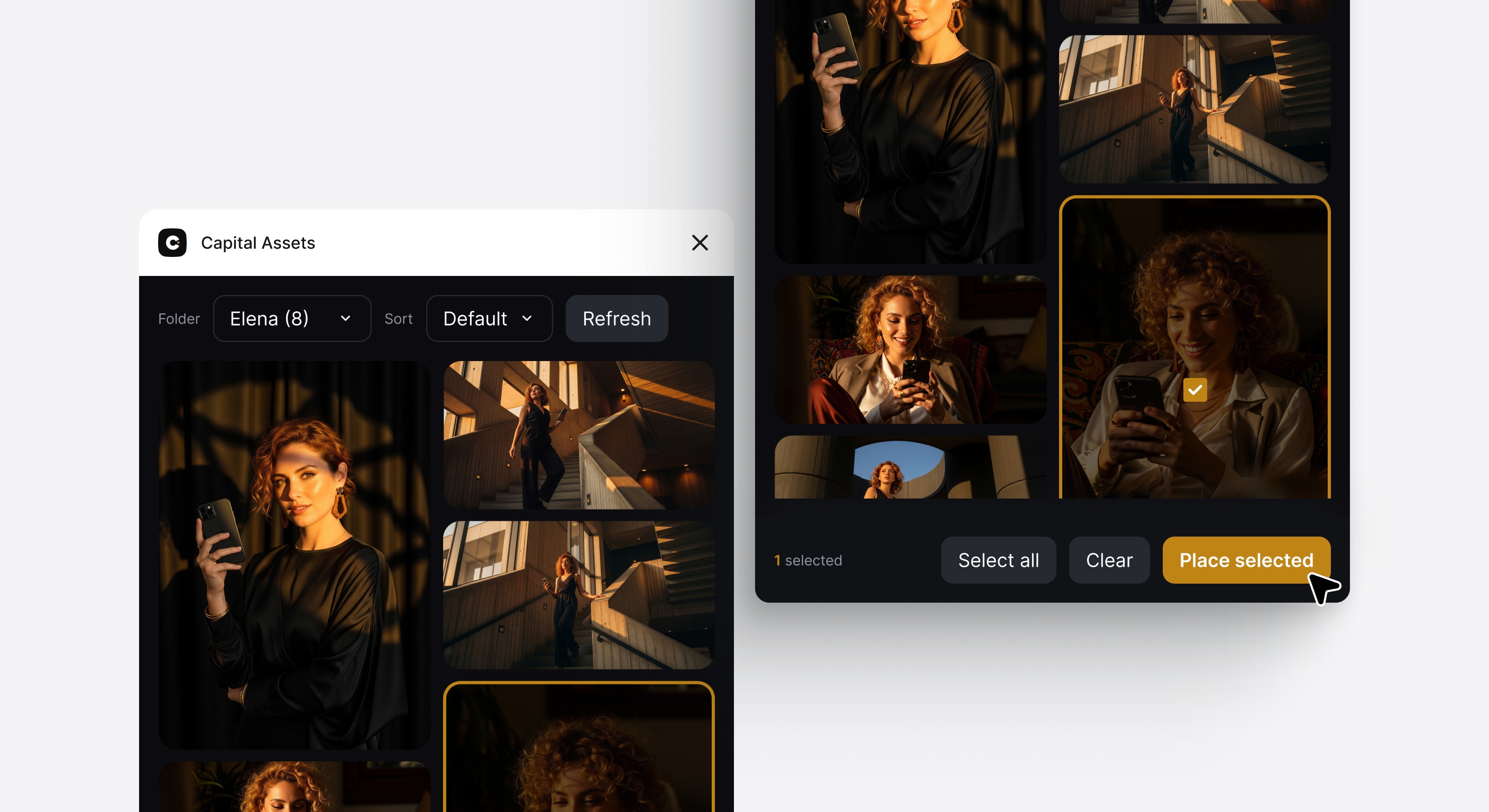
The plugin connects to an S3 bucket via CloudFront CDN. Each of the 20 character folders contains a JSON index file listing all available photos. The UI shows a Pinterest-style masonry grid - select what you need, hit "Place selected," and images appear on your canvas at full resolution.
The key piece: when I add a new photo to S3, a Lambda function automatically regenerates that character's index JSON. The plugin reads these indexes on load. No manual updating. No stale catalogs.

The plugin uses vanilla JavaScript - no framework overhead. Images load lazily with shimmer placeholders. Selection state persists across folder switches. Sorting options let you browse by recency.
On the backend, the Lambda function triggers on S3 ObjectCreated events, scans the folder, filters for image files, and writes a fresh JSON index. CloudFront serves everything with edge caching.
Before: "Hey does anyone have that shot of Marcus in the navy suit?
After: Open plugin → Marcus → scroll → place.
Before: Generating Diego and getting four different guys.
After: Same Diego every time. Distinguished silver threads. Natural intensity.
Before: Photos living in seventeen different folders.
After: One S3 bucket. Auto-indexed. Always current.
The system now holds 300+ character photos across 20 individuals, accessible in under 10 seconds from any Figma file.